

Tiger’s eye can show a shifting golden-brown sheen as the stone, light or your viewpoint moves. This reflected-light effect is called chatoyancy. A still photo captures one view; it cannot show the whole movement or promise the exact band pattern of the stone you will receive. Read the gallery alongside the product’s measurements and variation statement.
Why tiger’s eye seems to move in the light
Tiger’s eye is a variety of quartz with an aligned fibrous internal structure. Reflections from that structure produce its silky sheen. Chatoyancy can appear as a bright band that seems to move when the stone is turned; tiger’s eye often shows a softer golden-brown reflection. GIA’s guide to chatoyancy and other phenomenal gems explains this optical effect.
A moving reflection and a change in the overall color of a photograph are different observations. Lighting and camera white balance can also affect a photo’s color. A warmer-looking image alone does not show that the stone itself has changed color.
Changing reflection versus a different stone
Keep two questions separate when comparing a gallery: has the view of one stone changed, or are you seeing another stone? A different angle can change which areas look bright. A different cut piece can have a different band layout altogether. The product’s variation statement matters because lighting cannot explain every difference between stones.
Follow the visible stripes relative to the stone’s edges, rather than judging brightness alone. This gives you something to ask the seller about, but it cannot prove that two photographs show the same piece. If a particular pattern matters, request an image or short video of the ring intended for your order.
What each kind of photo can tell you
| View | Useful for | Still unanswered |
|---|---|---|
| One front still | Stone shape, general color range, band direction, overall design | How the sheen behaves at other angles; whether this exact stone ships |
| Another angle | Bezel height, edge profile and shoulder shape | Behavior under your own lighting |
| Close detail | Metal texture, setting finish, corner shape | Scale on the hand; full-stone pattern |
| Real-piece video, if the seller can provide one | Movement of the sheen across one specific stone | Stone identity, treatment or guaranteed color in other viewing conditions |
A four-step way to read a ring gallery
- Find the center and outline of the stone. Note its shape, corners and edge, then follow the band direction from image to image.
- Inspect bezel and shoulder angles. Side views show how the stone sits, how the edge is cut and how the metal frames it. Expect the sheen to look different in each one.
- Read the specification and variation statement. Check the materials and measurements, what each number refers to, and whether the listing says the stone pattern varies.
- Ask about the actual piece if the exact pattern matters. If you want one particular band layout, ask the seller whether the item you would receive can be photographed or filmed before it ships.
Two tiger’s eye settings to compare
Rectangular stone in a polished bezel
The Tiger’s Eye Ring with Textured Sterling Silver Band is the first example. Its listing specifies 925 sterling silver and a rectangular tiger’s eye measuring approximately 15×19 mm. That is the stone size, not the whole ring face. Approximately 26 g is the item weight, not a stone weight or a silver-only figure. The polished bezel has a broad, smooth edge; irregular cracked-texture shoulders and small cross motifs frame the setting.
The actual product detail photos show brown and golden lengthwise grain, clipped or rounded corners and sloping beveled edges. Front and oblique views help you inspect that outline and the setting. The listing says band patterns can vary between stones and that the gallery shows the ring design and setting. Use it to inspect those features, then ask about the particular stone if its stripe layout is important to you.

Rounded cabochon held by four claws
On the Tiger’s Eye Claw Sterling Silver Ring, four raised, pointed silver claw tips frame a rounded, brown polished cabochon, and a repeated scale pattern wraps around the shoulders, contrasting with the smooth domed stone. The listing gives the stone as approximately 14×12 mm and the ring face as approximately 18×18 mm, so the stone is only part of the face; the claws and surrounding silver make up the rest. Use the front view to check the outline and claw placement, then the oblique view to see the dome and raised claws in profile. The listing does not promise a particular band pattern, so ask about the stone itself if its stripe layout matters to you.
Choosing between the two
Choose the rectangular stone and polished bezel if you prefer that outline, or the rounded cabochon and four claws for a different setting. Compare each gallery’s shape and metalwork, then check current sizes; these photos do not establish which stone has a stronger sheen.
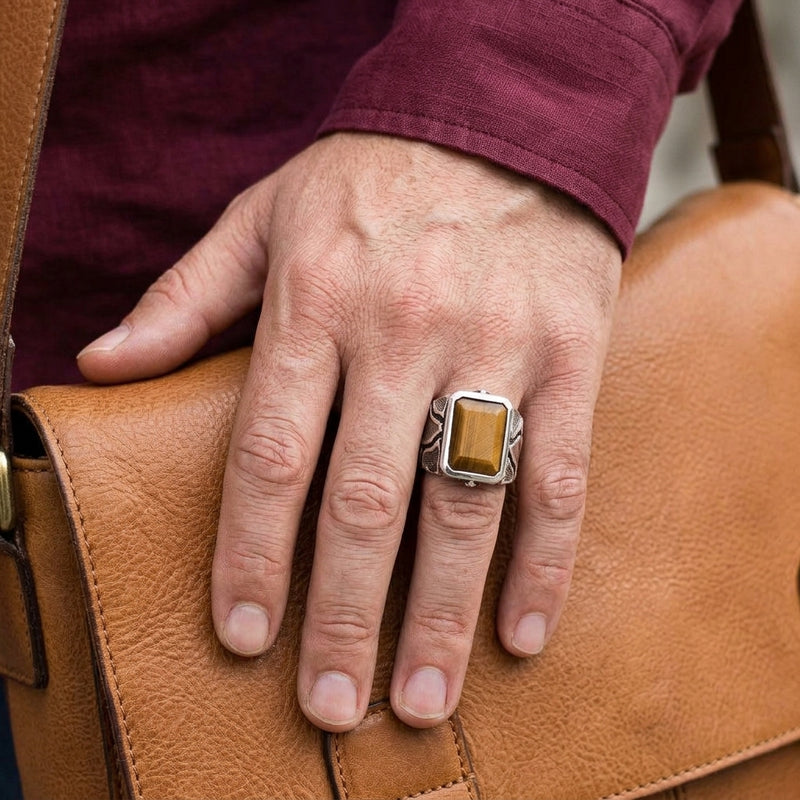
Tiger's Eye Ring with Textured Sterling Silver Band
A rectangular tiger’s eye of about 15×19 mm sits in a broad polished bezel between cracked-texture silver shoulders.
View gallery and sizes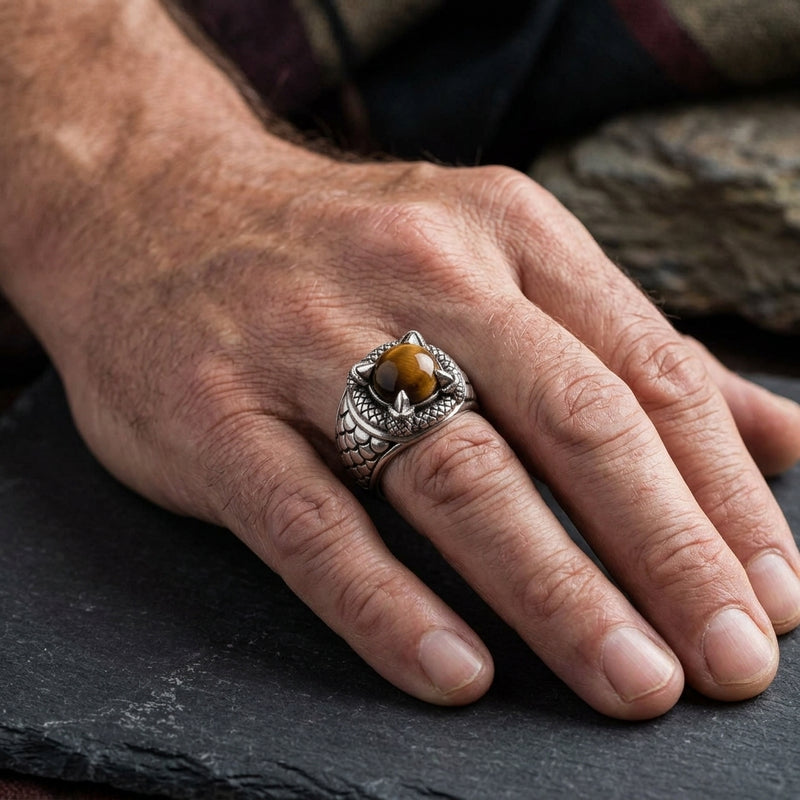
Tiger's Eye Claw Sterling Silver Ring
A rounded tiger’s eye cabochon of about 14×12 mm is framed by four silver claw tips and scale-pattern shoulders.
View gallery and sizesWhat a photo cannot confirm
A photograph alone cannot reliably establish stone identity or treatment. Neither product listing states a treatment, and photographs cannot settle that question. Neither a bright stripe nor a muted photo confirms those details. For a brief guide to reading material claims, see black onyx vs black CZ.
Choosing your size and next step
Once you are comfortable with how the gallery reads, choose from the size options shown on the product page and confirm your measurement with the ring size conversion chart. To compare other settings and stones, browse the gothic rings collection.

